Transaction guide
Categorise Transactions
The type on a row decides how it is taxed. A sale produces a capital gain, an airdrop is income at the value it arrived at, and a transfer between your own accounts should produce neither. This guide covers how the type is chosen and how to correct it.
How a row gets its type
- Your export is read in the browser and each row is matched to what the exchange called it.
- That name is mapped to one of CryptoKar's types, and the exchange's own tags travel with the row.
- The label on the row is worked out from the type and those tags, which is why two deposits can carry different labels.
- Where the export is vague, the row lands as a plain deposit or withdrawal. That is the case worth checking.
The types and what they do
| Type | What it does to your figures |
|---|---|
| Buy | Creates a lot. Its cost becomes the cost of acquisition for a future sale. |
| Sell and Trade | A disposal. Consumes the oldest lots of that coin and produces a gain taxed at 30% under Section 115BBH. |
| Swap | A disposal of one coin and an acquisition of another, in a single event. Both sides are computed. |
| Deposit | Coins arriving. Not taxable on its own, but with no purchase behind it the cost is estimated or flagged. |
| Withdrawal | Coins leaving. Where the other side is not imported, the leg reads as a disposal. |
| Airdrop | Treated as income at the value on the day it arrived, and that value becomes the cost basis for a later sale. |
| Reward and Fork | Income on arrival, valued the same way as an airdrop. |
| Staking | Staking interest. Recorded as income separately from your spot disposals. |
| Derivatives | Futures results, funding and derivative fees. Reported apart from spot capital gains in your report. |
For the full list of labels these types produce, see the transaction label guide.
Changing a category
Step 1: Find the row that is wrong
- Filter by Types or Labels on the Transactions page to see everything of one kind at once.
- A deposit with a value but no matching purchase is the usual sign of a miscategorised reward.
Step 2: Open Edit
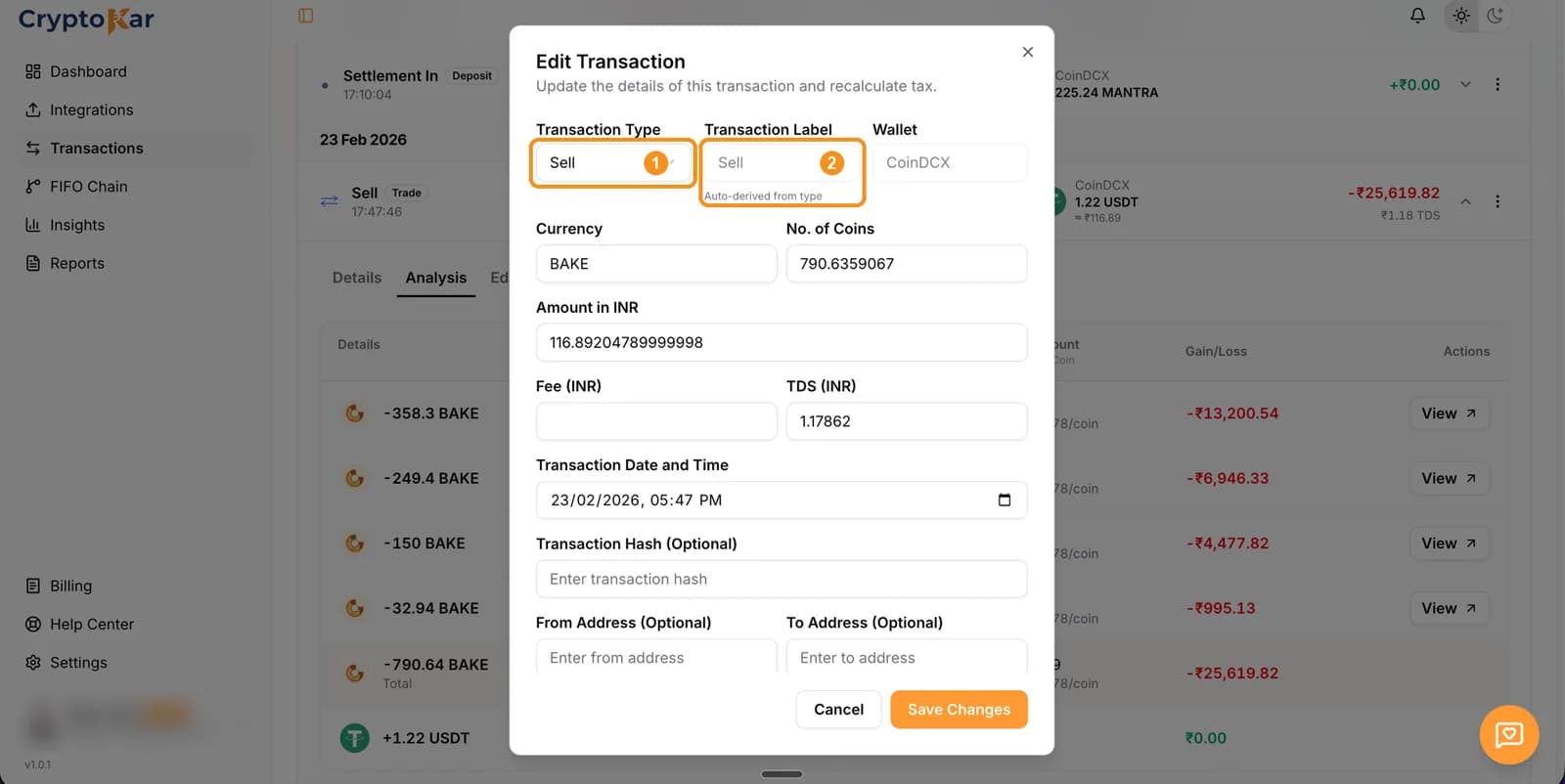
- Click the three dots on the row and choose Edit.
- Pick the correct Transaction Type from the list.
- Watch the Transaction Label update as you change the type. The label is derived, not typed.
Step 3: Fix the value while you are there
- Income types are valued at what the coin was worth when it arrived. Set Amount in INR to that value.
- Set the date and time to the arrival, since that is the day the valuation belongs to.
Step 4: Save and check the effect
- Save Changes. The row is reclassified and your totals move with it.
- Airdrops, rewards and staking appear under other income in your report rather than under capital gains.
Transfers between your accounts
This is the single biggest source of wrong numbers. Moving your own coins from one exchange to another is not a sale, but it only looks that way to CryptoKar when both sides are in your account.
- Import both exchanges. The outgoing leg on one and the incoming leg on the other then describe one move.
- With only one side imported, the withdrawal reads as a disposal and the deposit has no purchase behind it, so you are taxed twice over on the same coins.
- Where the other account is not a supported exchange, add the missing leg yourself so the cost basis carries across.
Adding a leg by hand is covered in adding transactions manually.
Four common mistakes
Scenario 1
An airdrop came in as a deposit
What happens: The export said coins arrived and nothing more, so the row reads as a plain deposit with no purchase behind it.
The fix: Edit the row, set the type to Airdrop, and set Amount in INR to the value on the day it landed. That value becomes both the income and the cost basis for a later sale.
Scenario 2
A staking reward looks like a deposit
What happens: Rewards paid out in small amounts often arrive as a series of deposits with no label.
The fix: Edit each one to Staking, or filter by coin and date range first so you can work through them together. The value on arrival is the income figure.
Scenario 3
Staking and unstaking read as disposals
What happens: Locking coins moves them out of your balance, and getting them back moves them in, so both legs can look like transfers.
The fix: Only the reward is income. Recategorise the lock and unlock so they are not treated as sales, and leave the reward rows as Staking.
Scenario 4
A peer to peer trade shows as a deposit
What happens: The rupee side happened outside the exchange, so the export only carries the coins moving.
The fix: Edit the row to Buy or Sell as appropriate and enter the rupee amount you actually paid or received.
Frequently Asked Questions
What people ask when a row is filed under the wrong heading.
Edge cases
- A row's label mentions futures but you never traded futures
- The exchange tagged it that way in the export. Check the trade on the exchange, then edit the type if it really was a spot trade.
- Settlement In and Settlement Out rows you do not recognise
- These come from derivatives settlement on the exchange. They belong to the derivatives side of your report, not to spot capital gains.
- A fee row appears on its own
- Some exports bill fees separately rather than inside the trade. Leave it as a fee row so it is not read as a disposal.
- An airdrop was worthless when it arrived
- Record the value it actually had, even where that is close to nothing. That figure becomes the cost basis, so a later sale is measured against it.
Unsure which type fits what happened? Describe it to us.
CryptoKar calculates your tax from the transaction data you import. Review your report before you file. If you have questions about your tax situation, speak with a qualified tax professional.
Last updated 21 August 2026
Calculate Your Crypto Tax
Import your exchange data and get started. Supports CoinDCX, WazirX, Binance and Bybit.