Portfolio guide
Reading Your Holdings
Active Holdings lists what you still own, coin by coin, with what it cost and what it is worth now. Every figure comes out of your imported transactions after FIFO has matched each disposal.
Seven columnsWhat remains, not what you boughtLive rupee prices
Every column explained
The numbers above the table match the list below it.
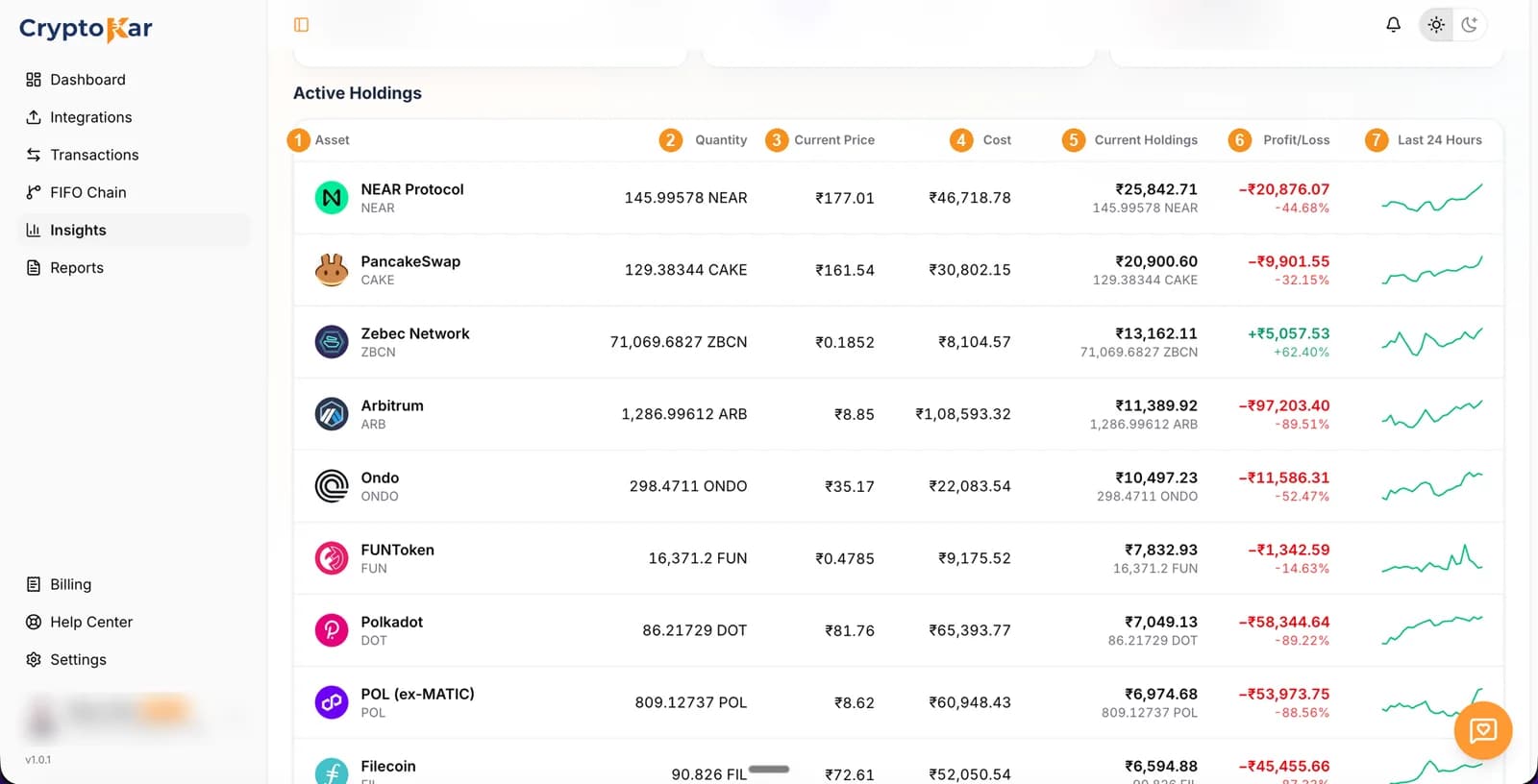
- AssetThe coin's name with its ticker underneath. The icon is the one CryptoKar matched the ticker to, which is worth a glance when a value looks wrong.
- QuantityHow much of the coin you still hold after every disposal has been matched by FIFO. Not what you ever bought, what is left.
- Current PriceThe live rupee price of one coin, refreshed while the page is open.
- CostWhat the remaining quantity cost you, taken from the lots still in inventory. Divide it by the quantity to get your average cost per coin.
- Current HoldingsQuantity multiplied by current price, with the quantity repeated underneath so you can see what is being valued.
- Profit/LossCurrent holdings minus cost, in rupees and as a percentage. Unrealised, because you still hold the coin.
- Last 24 HoursA sparkline of the coin's recent price movement. Shape only, for orientation rather than for a figure.
Cost and average cost
- Cost follows the lots you still hold. Buy at three different prices and sell some, and what remains is the cost of the lots FIFO has not consumed.
- Average cost per coin is Cost divided by Quantity. It is a readout, not the method: the tax engine works lot by lot, never on a blended average.
- Buying more at a lower price pulls the average down. Selling does not, because FIFO removes your oldest lots first.
- An average far below what you remember paying usually means a purchase is missing and those coins are being held at nil cost.
One row read in full
Zebec Network, a row in profit
- Quantity 71,069.68 ZBCN, which is what remains after every ZBCN disposal.
- Cost ₹8,104.57, so the average works out at roughly ₹0.114 a coin.
- Current price ₹0.1852, giving current holdings of ₹13,162.11.
- Profit of ₹5,057.53, which is +62.40% on the cost. Unrealised, so no tax arises on it yet.
Sell that position and the ₹5,057.53 stops being a portfolio figure. It becomes a gain in your report, taxed at 30% with 4% cess on the tax.
Holdings in your report
- The Excel workbook includes a holdings sheet listing your remaining positions alongside the tax sheets.
- The tax parts of the report come from disposals. Holdings are context, not a taxable figure.
- Reports stay in the list on the Reports page, so a holdings snapshot from an earlier date remains downloadable.
- Downloading a report needs a paid plan. Tracking your portfolio does not.
What else the file carries is listed in how to generate your tax report.
Frequently Asked Questions
What people ask when a holding does not match the exchange.
The cost of the coins you still hold, not everything you ever spent on that asset. Sell part of a position and the cost of the sold portion leaves this column, because those lots are gone from inventory.
Divide Cost by Quantity. CryptoKar tracks lots individually rather than blending them, so the average is a summary of the lots you hold rather than the basis used in the calculation.
Not when both sides are imported. The coins move between accounts and keep their original cost. With only one leg imported, the outgoing side reads as a disposal and the incoming coins arrive with no purchase behind them.
The table counts what your imported transactions add up to. A missing export, a withdrawal that never came in, or trades after your last upload will all move it away from the exchange's own figure.
Yes. The Excel workbook carries a Holdings sheet with your remaining positions. The PDF and Schedule VDA cover disposals, since those are what carry tax.
Either the quantity has gone to zero, in which case it has exited and sits in realised profits, or no price could be resolved for it. Coins with no price are kept out of the value figures rather than counted as zero.
CryptoKar calculates your tax from the transaction data you import. Review your report before you file. If you have questions about your tax situation, speak with a qualified tax professional.
Last updated 21 August 2026
Built for the Indian crypto community.
Calculate Your Crypto Tax
Import your exchange data and get started. Supports CoinDCX, WazirX, Binance and Bybit.